NTFS $LogFile Forensics: The Complete Guide
What the NTFS $LogFile records, how its pages and redo/undo records work, what it proves in an investigation, how to collect it and where it stops.
TL;DR. $LogFile is the NTFS crash-recovery journal (MFT entry 2). Every change NTFS makes to its own metadata — a FILE record, a directory index, a bitmap — is logged first as a pair of operations: redo (how to apply it) and undo (how to roll it back). Those bytes contain file names, parent folders, MFT references and before/after timestamps. That makes the log the best source for what changed in the last minutes to hours: creations, deletions, renames and moves, and $STANDARD_INFORMATION rewrites (timestomping). It has no clock of its own, it is circular, and it is low level. Collect it early, pair it with the $MFT, and correlate with $UsnJrnl:$J.
Most analysts meet $LogFile late: after the USN journal has been parsed, after the $MFT has been timelined, when a question still has no answer. Was this timestamp always 2019? What was this file called before it was renamed? What did that deleted text file contain? This guide is the map. Each section links to a deeper article in the NTFS $LogFile fundamentals and investigations series.
What the $LogFile is
NTFS is a recoverable file system. It does not journal file content; it journals metadata. The design has two layers, well described in dfir.ru's "How the $LogFile works?":
- The Log File Service (LFS) manages a circular ("infinite") log. It hands out log sequence numbers (LSNs), writes records into 4 KiB pages and keeps a restart area that says where recovery must start.
- The NTFS client of the LFS writes the actual log records. Each one names a redo and an undo operation and carries the bytes for both.
After a crash, Windows replays the redo side of committed transactions and applies the undo side of uncommitted ones. For an investigator, the same bytes answer "what did this structure look like just before and just after this change?"
$LogFile is file record 2 in the Master File Table, next to $MFT (0), $MFTMirr (1) and $Volume (3), as listed in Microsoft's NTFS metafiles overview and the libfsntfs format documentation. It lives at the root of every NTFS volume (C:\$LogFile, D:\$LogFile…) and is hidden and locked while the volume is mounted.
How the file is laid out
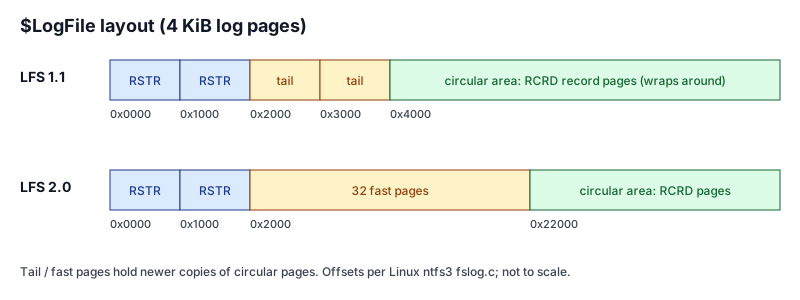
| Region | Offset (4 KiB pages) | Signature | What it holds |
|---|---|---|---|
| Restart page 0 | 0x0000 | RSTR (or CHKD) | Restart area: current LSN, log size, flags, client record |
| Restart page 1 | 0x1000 | RSTR | Second copy; the one with the higher current LSN wins |
| Tail pages (LFS 1.1) | 0x2000–0x3FFF | RCRD | Two copies of the page currently being written |
| Fast pages (LFS 2.0) | 0x2000–0x21FFF | RCRD | 32 pages written in turn instead of rewriting the circular page |
| Circular area | 0x4000 (1.1) / 0x22000 (2.0) | RCRD | Log record pages, oldest overwritten first |
Every page is protected by an update sequence array, the same torn-write protection used by FILE records. The version split (1.1 vs 2.0, tail vs fast pages) matters on Windows 8 and later, and is covered in $LogFile format 1.1 vs 2.0. The restart area and the LSN-to-offset formula are in restart area and LSNs explained.
What a log record contains
Each record starts with a 0x30-byte LFS header, followed by the NTFS client data. Field offsets below come from the Linux ntfs3 driver's fslog.c:
| Offset | Field | Why you care |
|---|---|---|
0x00 | This LSN | Unique, always increasing: gives ordering |
0x08 | Previous LSN (same transaction) | Chains records of one transaction |
0x10 | Undo-next LSN | Where rollback continues |
0x18 | Client data length | Size of the redo/undo payload block |
0x20 | Record type | 1 = client record, 2 = client restart (checkpoint) |
0x24 | Transaction ID | Groups records of one operation |
0x28 | Flags | 0x1 = record spans several pages |
The client data then begins with the NTFS log record header: redo opcode, undo opcode, offsets and lengths of the redo and undo bytes, the open attribute table index of the target attribute, the target VCN and the offsets that locate the change inside an MFT record or index buffer. Redo/undo operations explained walks through the opcodes that matter.
What it gives an investigator
Four families of evidence come out of the redo/undo bytes:
| Evidence | Operations involved | What you learn |
|---|---|---|
| File / folder creation | InitializeFileRecordSegment + AddIndexEntry* | MFT entry, sequence number, name, parent, $FILE_NAME and $STANDARD_INFORMATION times |
| Deletion | DeleteIndexEntry* + DeallocateFileRecordSegment | Which entry disappeared, under which name and parent |
| Rename / move | DeleteIndexEntry* + AddIndexEntry* for the same entry | Old name and folder, new name and folder |
| Timestamp change | UpdateResidentValue on $STANDARD_INFORMATION | Old and new values of the changed timestamps |
Small files add a fifth, opportunistic category: content held inside the FILE record (resident data) can appear in the record image or in a CreateAttribute payload. Treat it as a bonus, not a guarantee (see the limits below).
The two use cases that make $LogFile worth the effort:
- Timestomping. An
UpdateResidentValueon$STANDARD_INFORMATIONcarries the value before the change in its undo bytes. A creation time rewritten to 2019 is visible as a rewrite, not just as an odd value. Method and false positives: detecting timestomping with the $LogFile. - Short-lived files. A tool dropped, renamed, used and deleted within an hour may leave no FILE record in the
$MFT(entry reused) and only terse reason codes in the USN journal. The log can still hold its name, parent, sizes and times. See recovering deleted-file evidence.
Where it fits next to $MFT and $UsnJrnl
$MFT | $UsnJrnl:$J | $LogFile | |
|---|---|---|---|
| Nature | Current state | Change reasons, one record per change | Low-level before/after images |
| Typical history | Now (plus deleted, not-yet-reused entries) | Days to weeks | Minutes to hours |
| Own timestamp per entry | n/a | Yes | No |
| Before value of a timestamp | No | No | Yes |
The short version: $MFT is the snapshot, the USN journal is the history, $LogFile is the proof of what exactly changed. The full comparison, with scenarios, is in $LogFile vs $UsnJrnl vs $MFT. For USN parsing itself, use the sibling USN journal parser.
Collecting it
$LogFile cannot be opened with Explorer or copy on a mounted volume. You need raw NTFS access: KAPE's $LogFile target, Velociraptor's NTFS accessor, FTK Imager, RawCopy, or The Sleuth Kit's icat on an image (icat image.dd 2). Always take the $MFT of the same volume at the same time — the log refers to files by MFT entry, and the $MFT is what turns [MFT #322] into \ProgramData\Intel\m64.exe. Commands and pitfalls: how to acquire the NTFS $LogFile.
Reading it
Workflow in practice:
- Parse the log into raw records (LSN, transaction, redo/undo opcode, target).
- Rebuild file-system events from record groups.
- Resolve MFT entries to paths with the
$MFT. - Date events from the timestamps inside the data, and mark anything undated.
- Correlate with USN, Prefetch, event logs.
The in-browser $LogFile parser does steps 1 to 4 locally (Rust compiled to WebAssembly, nothing uploaded) and shows every raw record next to the events it built. Its flags — deletion, rename, possible timestomping, user-writable path, executable — are triage hints, not verdicts. A step-by-step run on the sample data is in how to analyze an NTFS $LogFile, and a full fictional case in the $LogFile investigation walkthrough.
One honesty note: that parser has so far been validated against synthetic logs built from the published format, not against a corpus of real Windows logs. For anything that goes into a report, confirm with a second tool; the options are compared in $LogFile parsers compared.
Where it stops
- Retention is short. The log is circular. On a busy system volume, expect minutes to hours; in dfir.ru's Windows 10 tests old data was overwritten after 16 minutes in one case and 5 hours 20 minutes in another.
- No clock. Records carry LSNs, not times. Times come from
$FILE_NAME/$STANDARD_INFORMATIONvalues inside the data. - Metadata only. Non-resident file content never goes through the log.
- Names are not always there. A record often only names an MFT entry; the name appears when the file is created, renamed or deleted, or via the
$MFT.
Details and mitigations: how far back does the $LogFile go?
Frequently asked questions
What is the NTFS $LogFile?
It is the NTFS metadata transaction journal, stored as MFT entry 2 at the root of every NTFS volume. Before NTFS changes its own metadata it writes a log record describing the change as a redo operation and an undo operation, so the volume can be repaired after a crash.
Does the $LogFile record timestamps?
Log records carry no clock time of their own. Times come from the data being logged: $STANDARD_INFORMATION and $FILE_NAME values inside the redo and undo bytes. Events with no such value can only be placed relative to their neighbours by LSN.
How far back does the $LogFile go?
It is circular and usually around 64 MiB, so it covers minutes to hours of activity on a busy system volume and more on quiet data volumes. One published test on Windows 10 saw old data overwritten after 16 minutes, another after 5 hours 20 minutes.
Further reading
- Maxim Suhanov, How the $LogFile works? — the best public description of LFS internals.
- Linux kernel,
fs/ntfs3/fslog.c— a working implementation of log replay, with structure offsets. - libyal, libfsntfs NTFS documentation.
- Joakim Schicht, LogFileParser — the reference open-source decoder, with a detailed readme.
- Gyu-Sang Cho, A computer forensic method for detecting timestamp forgery in NTFS, Computers & Security 34 (2013).